- Welcome to VGMaps.

Recent posts
#11
Mapping Tips/Guides / Re: What map-making feature wo...
Last post by mechaskrom - October 21, 2026, 10:33:52 AMQuote from: ReyVGM on October 17, 2026, 11:38:46 AMI'll add it to the requests, but it can be a bit complicated to grasp especially since none of us use those tools. Could you make a short video showing how it works and how you want that canvas thing to work? Although, it feels like this is getting a bit to close to image-editor territory.There are already quite a lot of guides and videos for emulator scripting. Some examples:
How to Write Lua Scripts for Video Games with the BizHawk Emulator
Bizhawk: Intro to Lua Scripting
CPS2/3 Romhacking: The basics of LUA
Scripting is basically an interface (API) the emulator provides that makes it possible to programmatically interact with the emulator and the emulated game. Lua is commonly used as the programming language in these scripts.
The in memory canvas thing would only need these four script functions for my use cases:
canvas = create(width, height) //New canvas with specified dimensions in pixels.
canvas.clear(color) //Clear whole canvas with specified color.
canvas.copyFromScreen(screenX, screenY, width, height, canvasX, canvasY) //Copy rectangular part of screen to canvas.
canvas.saveToFile(filepath) //Save canvas as a PNG-file.
The canvas is just a 2D array of RGB pixels. A big screenshot made up of many normal screenshots you could say. This is where the screenshots are stitched together into a map.
So it's not really an image editor. However you probably want/need some basic graphic functions in the script API so you can display text and other things. I often make scripts that show info about tilemaps, sprites and hidden items in the emulator's screen (script overlay) for example. A canvas window is useful for displaying more complicated stuff. Like this script for SimCity that displays the whole city in a canvas:
SimCity SNES map viewer script
Quote from: ReyVGM on October 17, 2026, 11:38:46 AMQuestion, if SuperSNES9x adds LUA support, is there a script you can use or does the emu author have to write its own script?Users write the scripts (they are just txt-files the emulator can open). You can probably even get an AI to help write one for you today. There exists many scripts, but unfortunately they are generally not compatible between different emulators. You often have to rewrite them a bit to get them working in another emulator.
Quote from: ReyVGM on October 17, 2026, 11:38:46 AMThere is a debugger in the works and once that's added, scripting can also be added.As SuperSNES9X is a fork of Snes9X, maybe it's possible to copy the lua scripting implementation from Snes9X Rerecording (snes9x rr)?
https://github.com/gocha/snes9x-rr
Quote from: ReyVGM on October 17, 2026, 11:38:46 AMI see you've written tools too. Can't you write your own tool and add it to SS9X once scripting is available? That way you can make the tool exactly how you (and other mappers) would like it.Probably depends on how much functionality the emulator exposes in its scripting API. With enough functionality you could probably write most tools, like a debugger, in scripts if you wanted too.
You can do a lot of crazy stuff with emulator scripting and that's why I love it
 . Like give Mega Man laser eyes or Mario a jetpack:
Best Scripts for Nintendo NES Emulator FCEUX!
#12
Gaming / Anyone Tried and Played ANTONB...
Last post by Cyartog959 - October 21, 2026, 07:56:56 AMI tell you, that game, ANTONBLAST, is really good to enjoy! It is a brilliant one from Summitsphere, at that!
It features a literally red-colored demolition expert named Dynamite Anton, or just Anton Ball, and his green-colored partner, Dynamite Annie, or Annie Bell, on a frantic, destruction-filled adventure to retrieve back a collection of Spirits, snatched away by the mole armies from the game's take on Big Bad Red One(if you know what I mean...) after finding out Anton's redder than him and enacts a plot to siphon his own flesh tone to be the reddest being in the whole world. When Anton gets enraged from the theft, he vows to find out the lowlife behind it and blast said being into teeny, tiny, little pieces!
Of course, Annie, having only a fond reason for a chance to be destructive of her own volition, joins in with him.
They both featured in Antonball, a mix of a rather unique take of a Breakout clone and a platformer at once, and its a really interesting game, too, but that's not the point.
The game features a great abundance of platforming reminiscent to that of "Wario Land 4", and it really fills that kind of void Nintendo left behind since "Wario Land: Shake It!", though, I'll admit, that latter game did felt quite slower than the previous because of the Wii's utilization on motion controls, mostly shaking for coins.
Unlike Wario Land 4 and Shake It!, though, rather than being split up into multiple sets of small stages that feature some exploration and little backtracking, ANTONBLAST features 12 SPRAWLING stages, and I do mean that by the word. The goal remains familiar; traverse the stage to find an item needed to progress through the game, in this case, one of Anton's stolen Spirits, look for a powerful detonator and trigger its countdown, and escape to the exit, fast, fast, FAST, before time runs out!
There's additional hidden items to collect, though, and finding them requires quick thinking and clever searching, including cosmetic spray cans that change your chosen character's palettes.
The stages vary, from the very rooftops of Boiler City, their hometown, to the labyrinthine Slowroast Sewers, beneath the depths of the Concrete Jungle, which is one of the stages' actual names, mind you, and even the shopping complexes of The Mad Mall!
Of course, upon triggering the countdown on each stage, there are light flashing sign arrows that guides players the way out, so as not to get lost in the chaos. I think it is much better to have guidance, unlike Wario Land 4's lack of guiding players to the exit after triggering the bomb switch.
Upon finishing said stage, Anton and Annie get transported to Brulo's Casino as their base of operations, though Brulo had barred him from not paying his tab in months, but because of the evil presences ruining his businesses, he will lift his ban on Anton once he rids them of said presences, and acts as his supplier for purchasable items that will help them on their quest, including extending escape time.
I, alongside others, really missed that kind of gameplay blueprint after Nintendo continuously neglected the Wario Land games for constantly creating WarioWare games as their focus. There's not been a new game from that series in a long time, honestly. I don't know why Nintendo couldn't just make a new Wario Land game after Shake It! and keep at it.
Nevertheless...
Across the game, there are bosses to pummel down to pulp, and they are not pulling punches on Anton and Annie, especially the main bosses themselves! They all must be defeated before confronting the evil one himself.
The game also had a large update, called "THE END", and it adds more bosses, more difficulty modes, additional languages, optimizations, fixes, and cosmetic changes... and, adding Lime Trial stages(Its not an intentionally misnamed joke; they really are stages involving collecting actual lime slices under a tight time limit).
The only minor pity is there's not a few new sound effects, custom-made or otherwise, added as part of the update, such as the Sewer Shark having sound effects for boosting and fast movement, for one.
Should ANTONBLAST have a sequel continuing on that kind of blueprint, which I would REALLY love, I would like to see many more new stages past the amount of 12, longer and larger stages, more new bosses to fight, more permanent health upgrades past 6/7, and some stages having an exclusive escape path open to the exit, with blockades preventing backtracking and/or being accidentally dropped to a time-costing path during the countdown as a minor consequence, rather than going back to where players started upon triggering the detonation timer; a sort of a "Point A(start) to B(objective item and detonator) and C(exit)" goal in them, as it were.
Summitsphere's lead, Tony Grayson, did say we've not seen... "The BLAST of Anton" after the game did very well. And, from his comments about worrying about burnout after launching the game, I wouldn't have him worry about it. It would take much more than just launching a game after developing it to experience some burnout.
Out of many games not yet mapped, I'm quite surprised its this game.
Here's its launch trailer for the Switch to give you a clear grasp on what its about...
And, the game's update, "THE END", trailer video...
Anyone wanting to give ANTONBLAST a go, its your chance, for its already out on PC, the Switch(which was delayed slightly because of weather attacks then), and PlayStation systems! I've been enjoying it!
Be ready to enjoy the speedy, explosive carnage coming at you! You'll have... a REAL BLAST!
It features a literally red-colored demolition expert named Dynamite Anton, or just Anton Ball, and his green-colored partner, Dynamite Annie, or Annie Bell, on a frantic, destruction-filled adventure to retrieve back a collection of Spirits, snatched away by the mole armies from the game's take on Big Bad Red One(if you know what I mean...) after finding out Anton's redder than him and enacts a plot to siphon his own flesh tone to be the reddest being in the whole world. When Anton gets enraged from the theft, he vows to find out the lowlife behind it and blast said being into teeny, tiny, little pieces!
Of course, Annie, having only a fond reason for a chance to be destructive of her own volition, joins in with him.
They both featured in Antonball, a mix of a rather unique take of a Breakout clone and a platformer at once, and its a really interesting game, too, but that's not the point.
The game features a great abundance of platforming reminiscent to that of "Wario Land 4", and it really fills that kind of void Nintendo left behind since "Wario Land: Shake It!", though, I'll admit, that latter game did felt quite slower than the previous because of the Wii's utilization on motion controls, mostly shaking for coins.
Unlike Wario Land 4 and Shake It!, though, rather than being split up into multiple sets of small stages that feature some exploration and little backtracking, ANTONBLAST features 12 SPRAWLING stages, and I do mean that by the word. The goal remains familiar; traverse the stage to find an item needed to progress through the game, in this case, one of Anton's stolen Spirits, look for a powerful detonator and trigger its countdown, and escape to the exit, fast, fast, FAST, before time runs out!
There's additional hidden items to collect, though, and finding them requires quick thinking and clever searching, including cosmetic spray cans that change your chosen character's palettes.
The stages vary, from the very rooftops of Boiler City, their hometown, to the labyrinthine Slowroast Sewers, beneath the depths of the Concrete Jungle, which is one of the stages' actual names, mind you, and even the shopping complexes of The Mad Mall!
Of course, upon triggering the countdown on each stage, there are light flashing sign arrows that guides players the way out, so as not to get lost in the chaos. I think it is much better to have guidance, unlike Wario Land 4's lack of guiding players to the exit after triggering the bomb switch.
Upon finishing said stage, Anton and Annie get transported to Brulo's Casino as their base of operations, though Brulo had barred him from not paying his tab in months, but because of the evil presences ruining his businesses, he will lift his ban on Anton once he rids them of said presences, and acts as his supplier for purchasable items that will help them on their quest, including extending escape time.
I, alongside others, really missed that kind of gameplay blueprint after Nintendo continuously neglected the Wario Land games for constantly creating WarioWare games as their focus. There's not been a new game from that series in a long time, honestly. I don't know why Nintendo couldn't just make a new Wario Land game after Shake It! and keep at it.
Nevertheless...
Across the game, there are bosses to pummel down to pulp, and they are not pulling punches on Anton and Annie, especially the main bosses themselves! They all must be defeated before confronting the evil one himself.
The game also had a large update, called "THE END", and it adds more bosses, more difficulty modes, additional languages, optimizations, fixes, and cosmetic changes... and, adding Lime Trial stages(Its not an intentionally misnamed joke; they really are stages involving collecting actual lime slices under a tight time limit).
The only minor pity is there's not a few new sound effects, custom-made or otherwise, added as part of the update, such as the Sewer Shark having sound effects for boosting and fast movement, for one.
Should ANTONBLAST have a sequel continuing on that kind of blueprint, which I would REALLY love, I would like to see many more new stages past the amount of 12, longer and larger stages, more new bosses to fight, more permanent health upgrades past 6/7, and some stages having an exclusive escape path open to the exit, with blockades preventing backtracking and/or being accidentally dropped to a time-costing path during the countdown as a minor consequence, rather than going back to where players started upon triggering the detonation timer; a sort of a "Point A(start) to B(objective item and detonator) and C(exit)" goal in them, as it were.
Summitsphere's lead, Tony Grayson, did say we've not seen... "The BLAST of Anton" after the game did very well. And, from his comments about worrying about burnout after launching the game, I wouldn't have him worry about it. It would take much more than just launching a game after developing it to experience some burnout.
Out of many games not yet mapped, I'm quite surprised its this game.
Here's its launch trailer for the Switch to give you a clear grasp on what its about...
And, the game's update, "THE END", trailer video...
Anyone wanting to give ANTONBLAST a go, its your chance, for its already out on PC, the Switch(which was delayed slightly because of weather attacks then), and PlayStation systems! I've been enjoying it!
Be ready to enjoy the speedy, explosive carnage coming at you! You'll have... a REAL BLAST!
#13
Map Requests / Re: JonLeung's Requests
Last post by Cyartog959 - October 21, 2026, 06:23:39 AMQuote from: JonLeung on October 18, 2026, 01:44:00 PMQuote from: Cyartog959 on October 17, 2026, 09:43:50 PMQuote from: JonLeung on October 17, 2026, 02:51:37 PMThough, yes, you may have noticed the maps aren't 1:1. Timbrewulf and I have talked about it. But I'm still happy to have these maps as they are, maybe it'll draw more attention to Lovish. Fans of puzzly platformers should check it out! I 100%ed it earlier this year, and it was quite satisfying to do so, especially the timed challenges. I got it for free through a giveaway on social media, but I'd happily have paid for it, considering how much fun I had playing it.Well, yes, I noticed they're not 1:1, mainly because the game's engine is made with Clickteam Fusion. I'm not disappointed. I'm sure Timbrewulf will revise the maps to be 1:1 later with the select, proper tools suited for ripping Clickteam made game maps.
I don't think that Clickteam Fusion has much to do with it... At least not specifically...
By playing the game windowed, with the options of Window Size = x1 and Soft Pixels = OFF, the pixels come out 1:1 and clean.
Or when playing the game fullscreen, set your display to 1280 x 768, and set the options to Window Size = Fullscreen 1 and Soft Pixels = OFF, then do a pixel resize to 25% (since 1280 x 768 is four times larger in each dimension to 320 x 192, the original resolution).
I think it's important to consider checking the options to games with the retro aesthetic. Mapping seems more "right" with 1:1, unfiltered graphics.
Anyways, most of the Lovish maps have now been corrected to be 1:1, so thanks again to TimbreWulf, especially for putting up with my concerns.
OH... That's why the previous batch of maps turned out like that before they got revised. Guess they looked less crisp with the Soft Pixels option on and graphics filters on. I tried guessing a few reasons on how and why that happened.
Well, at least, anyone willing to do maps can look up on necessary instructions here to have them 1:1 and unfiltered, for later point of reference.
#14
Map Requests / Re: List of unmapped NES games
Last post by JonLeung - October 18, 2026, 04:44:14 PMHappy 41st birthday to the NES!
Thought I'd take this oportunity to make a collage of the boxes of the 104 officially-licensed North American NES games that we still don't have maps for...
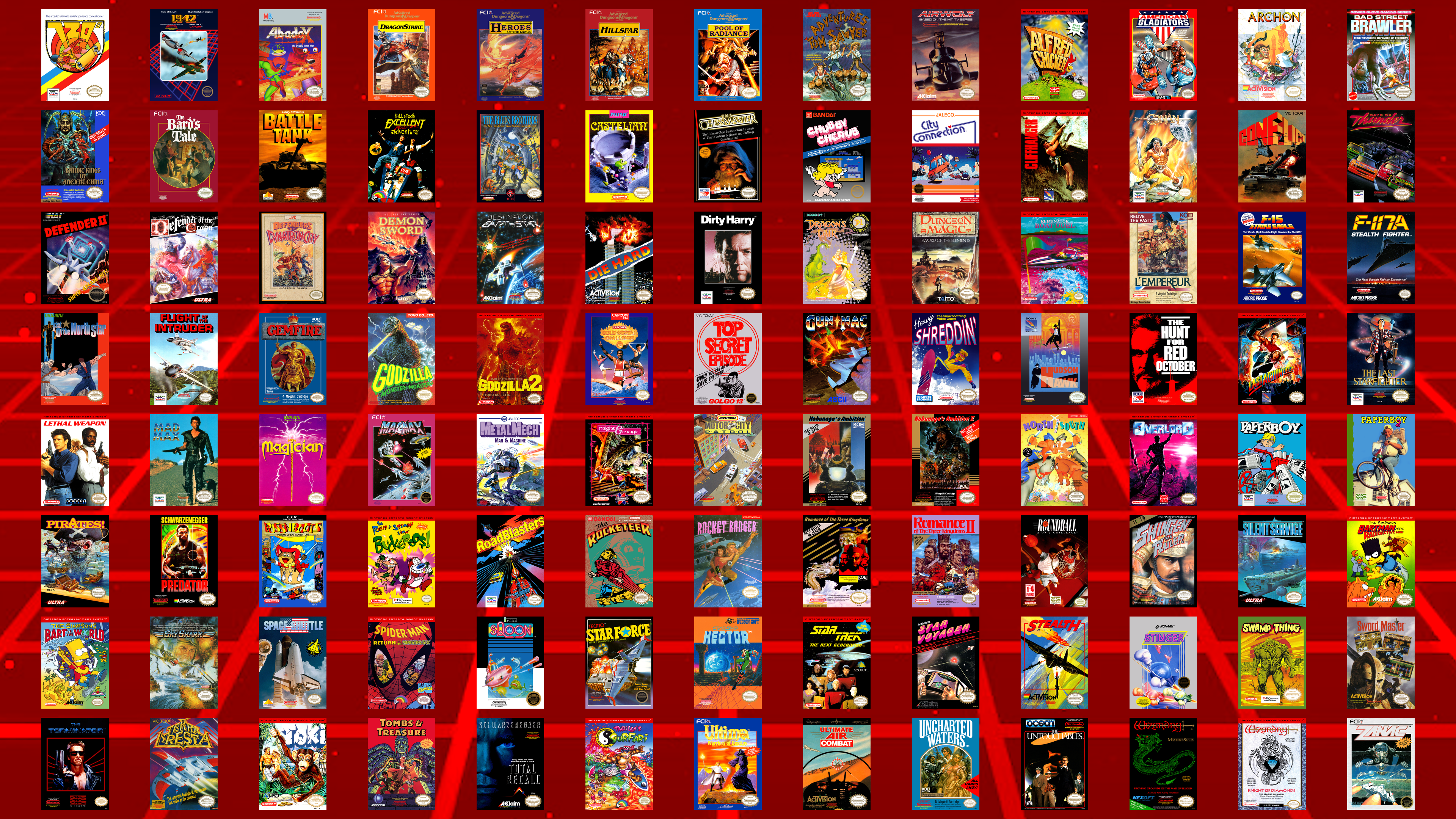
Interestingly, there are two Mel Gibson movie games next to each other alphabetically - Lethal Weapon and Mad Max.
There are four Schwarzenegger movie games - Last Action Hero, Predator, The Terminator, and Total Recall. (I don't think Conan counts...)
Are there any games here that are surprising that they haven't been mapped yet?
Thought I'd take this oportunity to make a collage of the boxes of the 104 officially-licensed North American NES games that we still don't have maps for...
Interestingly, there are two Mel Gibson movie games next to each other alphabetically - Lethal Weapon and Mad Max.
There are four Schwarzenegger movie games - Last Action Hero, Predator, The Terminator, and Total Recall. (I don't think Conan counts...)
Are there any games here that are surprising that they haven't been mapped yet?
#15
Map Requests / Re: JonLeung's Requests
Last post by JonLeung - October 18, 2026, 01:44:00 PMQuote from: Cyartog959 on October 17, 2026, 09:43:50 PMQuote from: JonLeung on October 17, 2026, 02:51:37 PMThough, yes, you may have noticed the maps aren't 1:1. Timbrewulf and I have talked about it. But I'm still happy to have these maps as they are, maybe it'll draw more attention to Lovish. Fans of puzzly platformers should check it out! I 100%ed it earlier this year, and it was quite satisfying to do so, especially the timed challenges. I got it for free through a giveaway on social media, but I'd happily have paid for it, considering how much fun I had playing it.Well, yes, I noticed they're not 1:1, mainly because the game's engine is made with Clickteam Fusion. I'm not disappointed. I'm sure Timbrewulf will revise the maps to be 1:1 later with the select, proper tools suited for ripping Clickteam made game maps.
I don't think that Clickteam Fusion has much to do with it... At least not specifically...
By playing the game windowed, with the options of Window Size = x1 and Soft Pixels = OFF, the pixels come out 1:1 and clean.
Or when playing the game fullscreen, set your display to 1280 x 768, and set the options to Window Size = Fullscreen 1 and Soft Pixels = OFF, then do a pixel resize to 25% (since 1280 x 768 is four times larger in each dimension to 320 x 192, the original resolution).
I think it's important to consider checking the options to games with the retro aesthetic. Mapping seems more "right" with 1:1, unfiltered graphics.
Anyways, most of the Lovish maps have now been corrected to be 1:1, so thanks again to TimbreWulf, especially for putting up with my concerns.
#16
Map Requests / Re: JonLeung's Requests
Last post by Cyartog959 - October 17, 2026, 09:43:50 PMQuote from: JonLeung on October 17, 2026, 02:51:37 PMProbably the newest game on my list has been mapped by TimbreWulf! It's the indie game, Lovish!
It's a retro-styled puzzlish platformer, with most stages being a single screen, where you try to unlock the exit and then make your way to it. It's got some fun references to other games, like in the fun scenes in between each challenge. I'm not so demanding as to ask for all those random events to all be mapped, LOL.
Well, its rather neat to see such a game mapped, even though its all made into random chances of different events, but the callbacks to past games are rather a nice touch. I'll admit, it is rather confusing to me upon seeing its trailer.
QuoteThough, yes, you may have noticed the maps aren't 1:1. Timbrewulf and I have talked about it. But I'm still happy to have these maps as they are, maybe it'll draw more attention to Lovish. Fans of puzzly platformers should check it out! I 100%ed it earlier this year, and it was quite satisfying to do so, especially the timed challenges. I got it for free through a giveaway on social media, but I'd happily have paid for it, considering how much fun I had playing it.
Well, yes, I noticed they're not 1:1, mainly because the game's engine is made with Clickteam Fusion. I'm not disappointed. I'm sure Timbrewulf will revise the maps to be 1:1 later with the select, proper tools suited for ripping Clickteam made game maps.
Good for you on having that game for free and finishing it 100%, Jon.
#17
Map Requests / Re: JonLeung's Requests
Last post by JonLeung - October 17, 2026, 02:51:37 PMProbably the newest game on my list has been mapped by TimbreWulf! It's the indie game, Lovish!
It's a retro-styled puzzlish platformer, with most stages being a single screen, where you try to unlock the exit and then make your way to it. It's got some fun references to other games, like in the fun scenes in between each challenge. I'm not so demanding as to ask for all those random events to all be mapped, LOL.
Though, yes, you may have noticed the maps aren't 1:1. Timbrewulf and I have talked about it. But I'm still happy to have these maps as they are, maybe it'll draw more attention to Lovish. Fans of puzzly platformers should check it out! I 100%ed it earlier this year, and it was quite satisfying to do so, especially the timed challenges. I got it for free through a giveaway on social media, but I'd happily have paid for it, considering how much fun I had playing it.
The fourth stage, the Kingdom Of Mirrors, has this rocking music. The official YouTube video of this music track only has 178 views as of now - probably half of those are mine, LOL, as I've come back to this several times this year when I play YouTube music in the background while I work. This game is seriously underrated, and more gamers should check it out.
It's a retro-styled puzzlish platformer, with most stages being a single screen, where you try to unlock the exit and then make your way to it. It's got some fun references to other games, like in the fun scenes in between each challenge. I'm not so demanding as to ask for all those random events to all be mapped, LOL.
Though, yes, you may have noticed the maps aren't 1:1. Timbrewulf and I have talked about it. But I'm still happy to have these maps as they are, maybe it'll draw more attention to Lovish. Fans of puzzly platformers should check it out! I 100%ed it earlier this year, and it was quite satisfying to do so, especially the timed challenges. I got it for free through a giveaway on social media, but I'd happily have paid for it, considering how much fun I had playing it.
The fourth stage, the Kingdom Of Mirrors, has this rocking music. The official YouTube video of this music track only has 178 views as of now - probably half of those are mine, LOL, as I've come back to this several times this year when I play YouTube music in the background while I work. This game is seriously underrated, and more gamers should check it out.
#18
Mapping Tips/Guides / Re: What map-making feature wo...
Last post by ReyVGM - October 17, 2026, 01:02:48 PMQuote from: Guard Master on August 27, 2026, 07:55:01 PMSome features I'd like to have in an emulator in use for map-making are:
-The ability to directly copy to clipboard, whether the emulation screen, the tilemap viewer, sprite viewer, or tile viewer. You can even copy multiple images to clipboard and select them via WIN+V.
This will be available on the next release. You can use a hotkey to copy to clipboard the game screen and the viewers. You can even copy multiple images to clipboard and select them via WIN+V.
#19
Mapping Tips/Guides / Re: What map-making feature wo...
Last post by ReyVGM - October 17, 2026, 11:38:46 AMQuote from: Guard Master on September 19, 2026, 05:23:54 AMQuote from: ReyVGM on September 13, 2026, 02:31:38 PMGood news. SuperSNES9x does have the option to display "accurate SNES colors". I haven't tested it, but it's there in Video -> Color Correction.
That's great. Tried it myself with the latest release. Getting my hopes higher for the emulator to be the next one I use as default. Here are additional features I'd like to see:
1. Support to combine multiple of the "tools" windows (e.g., the viewers, debugger, cheats, etc.) into a single window, offering tabs to switch between them. Having all these windows opened while I'm also alternating between other external windows becomes overwhelming.
2. Support to enable "widescreen" view. More emulators are supporting this including the latest Super ZSNES. Also, support to disable overscan (to allow 240 pixel height viewable instead of the typical 224 pixels in most games). Lastly, not sure if even possible, but the best would be support to have the emulation screen be the same size as the tilemap viewer and display as much as possible of bg + sprites.
Sorry for the late reply.
1) I suppose I could ask for this to be implemented, although the multiple windows option should stay too in case someone wants to look at all the viewers at the same time. Personally, I wouldn't want to have to be clicking tabs every time I want to check on one of the tools. I much prefer to have them in their individual windows.
2) Widescreen view is not something were you can just push a button and it's enabled. It requires someone to enable it on a per game basis as far as I know (but it is something that will eventually be implemented somehow). Snes9x/SuperSNES9x already displays 240pixel games in that height if they support it. But even if it didn't, there's an option in the video settings that does what you want already. I personally never use it, so if it's not working right, let me know.
Not sure what you mean with that last one. You want the emulation screen (meaning, the game screen?) to be as big as the titlemap viewer? You can modify the size of both the emulator screen and the viewer already.
Quote from: mechaskrom on October 09, 2026, 12:32:47 PMPretty much what everyone have already said, but I just wanted to add one feature that I REALLY want in an emulator for mapping and that's scripting. It's extremely useful for automating the screenshot+stitch process and saves a lot of time and work. Sadly, very few emulators have script-support. BizHawk is one of the few that does, which is why it's my goto emulator for mapping games. Plus it has many other excellent features/tools.
https://tasvideos.org/Bizhawk/LuaFunctions
Some other emulators with scripting that I know of is FCEUX, Lsnes and Snes9X Rerecording (snes9x rr).
Scripting exposes an API to the emulator so you get great control of the emulated game. My scripts usually just use the memory read/write functions to change the camera position in the emulated game and then the take screenshot function.
Something BizHawk lacks in its scripting and I would like to see is an in memory drawing canvas that you can blit copy a rectangular part of the current screen to. The canvas could then be used to stitch together the map into and then saved to file. Currently I have to call an external tool that takes a txt-file with blit commands from the BizHawk script that stitches together all taken screenshot files. It works, but it would be nicer if this could be done entirely inside the script.
BizHawk has a canvas (LuaCanvas object), but it's a GUI desktop window and as far as I know it's not possible to close or hide it which is annoying. Especially when stitching a really big map. Plus you cannot copy from the screen to the canvas, only from image files.
I'll add it to the requests, but it can be a bit complicated to grasp especially since none of us use those tools. Could you make a short video showing how it works and how you want that canvas thing to work? Although, it feels like this is getting a bit to close to image-editor territory.
Question, if SuperSNES9x adds LUA support, is there a script you can use or does the emu author have to write its own script?
There is a debugger in the works and once that's added, scripting can also be added.
I see you've written tools too. Can't you write your own tool and add it to SS9X once scripting is available? That way you can make the tool exactly how you (and other mappers) would like it.
#20
Gaming / Re: EmuVR - emulation in VR
Last post by lucaskinney - October 17, 2026, 02:07:24 AMEmuVR really hits differently if you grew up in the 80s or 90s!
Moving to PVCR streaming over wifi 6 completely removes that cable restriction. Sitting on an actual couch or carpet in your room white playing inside the virtual 90s bedroom feels much more immersive.
It's funny suing a $1000+ VR rig just to play 8-bit games on a virtual 14-inch tube TV, but the atmosphere is unmatched.
Moving to PVCR streaming over wifi 6 completely removes that cable restriction. Sitting on an actual couch or carpet in your room white playing inside the virtual 90s bedroom feels much more immersive.
It's funny suing a $1000+ VR rig just to play 8-bit games on a virtual 14-inch tube TV, but the atmosphere is unmatched.