- Welcome to VGMaps.

Recent posts
#1
VGMaps Social Board / I'm Worried About the Future o...
Last post by Cyartog959 - Today at 06:25:36 AMWhat Nintendo left for a lot of people, we grew up with the real true dedicated gaming handhelds that gave us great games, even the dual-screen DS and 3DS games. The smartphone mobile games have since been alienating and mentally reconforming many of their minds to think and believe their purpose and history doesn't exist to them, and that brings sadness in my heart, as well as others' out there that still crave for the exact experiences they grew up with in their childhoods. Even they are not educated on their proper history and creation beneath them.
Yes, I haven't forgotten Sony's PSP and Vita, too. They were, and still are, neat.
Not only that, but they gave developers more work to create games when they got unique SDKs for them, and that gave them joy to work on them alongside home console games and see gamers buy and play them to see their work in fruition.
I'm very worried that there's no way to really preserve these kind of games for current and new players to truly enjoy and cherish for later generations, both physically and digitally. When some people try to speak about that to others, they just scoff at them and constantly tell them to only get mobile, hybrids, and PC-made devices over and over, because they think they're all they want and need for gaming, when in truth, it's not. They really don't fit in pockets, period.
They don't fill the void at all, and it really puts the future of that kind of gaming outlet into question. They are not, nay, never, inevitably destined to be worthless junk heaps, nor their games to be delisted, unplayable, and unobtainable. They have real charm.
What a true dedicated handheld gaming system needs, even a dual-screen in the lines of 3DS, is to take improved fidelity and tech capabilities into account, even matching both screens' sizes to be wide, add a few new features to give them extra distinction, and make them future-proof, especially to stand out against mobile games that don't have the same experiences. It's never that difficult to say, ask, and do. It does take work, yes, but doing it is not impossible.
I really hope and pray(which helps in any situation, per say) for such new systems to be made to more than accomplish such goals for gamers and preservationists.
Yes, I haven't forgotten Sony's PSP and Vita, too. They were, and still are, neat.
Not only that, but they gave developers more work to create games when they got unique SDKs for them, and that gave them joy to work on them alongside home console games and see gamers buy and play them to see their work in fruition.
I'm very worried that there's no way to really preserve these kind of games for current and new players to truly enjoy and cherish for later generations, both physically and digitally. When some people try to speak about that to others, they just scoff at them and constantly tell them to only get mobile, hybrids, and PC-made devices over and over, because they think they're all they want and need for gaming, when in truth, it's not. They really don't fit in pockets, period.
They don't fill the void at all, and it really puts the future of that kind of gaming outlet into question. They are not, nay, never, inevitably destined to be worthless junk heaps, nor their games to be delisted, unplayable, and unobtainable. They have real charm.
What a true dedicated handheld gaming system needs, even a dual-screen in the lines of 3DS, is to take improved fidelity and tech capabilities into account, even matching both screens' sizes to be wide, add a few new features to give them extra distinction, and make them future-proof, especially to stand out against mobile games that don't have the same experiences. It's never that difficult to say, ask, and do. It does take work, yes, but doing it is not impossible.
I really hope and pray(which helps in any situation, per say) for such new systems to be made to more than accomplish such goals for gamers and preservationists.
#2
Maps In Progress / deficitattack maps
Last post by deficitattack - Yesterday at 01:40:15 PMHi everyone, new to vgmaps but not to ripping in general...
I have ripped all (I hope) backgrounds of Star Ocean 2 on PSX, if someone is interested...
Also I've started Snatcher on MEGACD but it's incomplete (need to debug more)
I have ripped all (I hope) backgrounds of Star Ocean 2 on PSX, if someone is interested...
Also I've started Snatcher on MEGACD but it's incomplete (need to debug more)
#3
Mapping Tips/Guides / New and better version of snes...
Last post by ReyVGM - April 20, 2026, 01:50:06 PMSomeone called shanytc has developed a fork of SNES9X called SuperSNES9X which has a lot of good features lacking from the main branch, features which can be helpful to map makers.
Some of these features, of course, are available on more modern emulators such as BSNES, Bizhawk, Mesen and the sort. But personally, I still prefer to use snes9x because it's really fast and has the least amount of annoyances when compared to other emulators.
Anyway, some of the new features it has is a BSNES-quality sprite/titlemap viewer with the option to export the graphics.
The cheat search and cheat editors have been updated too. You can now batch add addresses and edit them. There's right click implementation too and having the cheat editor open no longer pauses the game. It also now allows to have multiple bindings so you can assign both a controller and keyboard to the same input.
Every config file or save state from the regular snes9x will work with this branch and viceversa.
Here's the latest release:
https://github.com/shanytc/snes9x/releases/tag/1.63.10
Some of these features, of course, are available on more modern emulators such as BSNES, Bizhawk, Mesen and the sort. But personally, I still prefer to use snes9x because it's really fast and has the least amount of annoyances when compared to other emulators.
Anyway, some of the new features it has is a BSNES-quality sprite/titlemap viewer with the option to export the graphics.
The cheat search and cheat editors have been updated too. You can now batch add addresses and edit them. There's right click implementation too and having the cheat editor open no longer pauses the game. It also now allows to have multiple bindings so you can assign both a controller and keyboard to the same input.
Every config file or save state from the regular snes9x will work with this branch and viceversa.
Here's the latest release:
https://github.com/shanytc/snes9x/releases/tag/1.63.10
#4
Map Gab / Re: VGMaps.com now has over 50...
Last post by JonLeung - April 16, 2026, 08:33:07 AM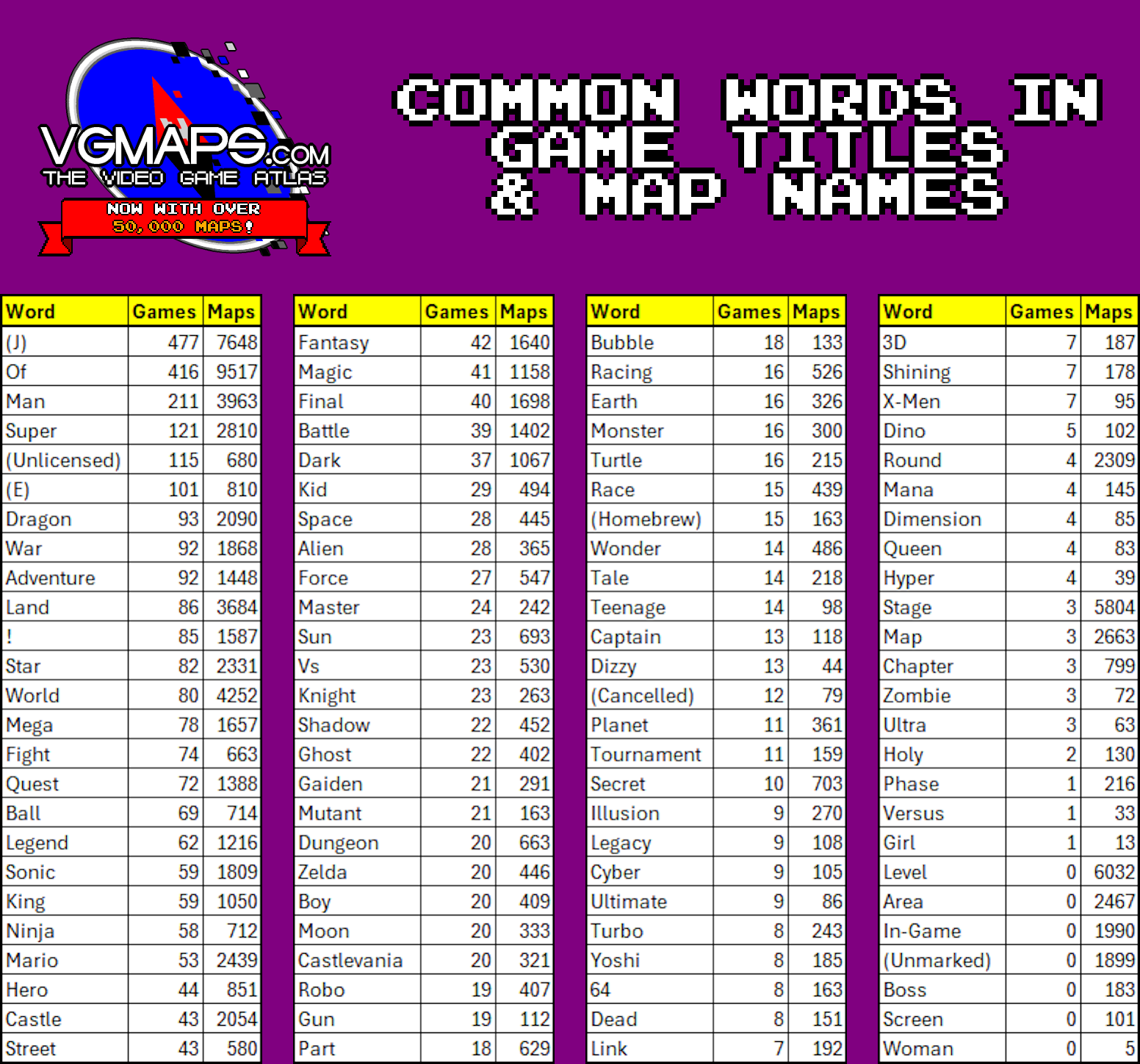
Here are 100 words in game titles/map names, listed here by frequency.
"Man" is among the most common, but "Woman" is the least.
"Final/Battle/Dark/Kid" & "Space/Alien/Force" are next to each other.
#5
Map Gab / Re: The LARGEST map - G.E.R.'s...
Last post by Cyartog959 - April 16, 2026, 03:34:44 AMQuote from: G.E.R. on April 15, 2026, 12:58:46 AM
420000 screenshots is no so scary as it might seem at first glance. All images was captured, distributed to folders, imported in Photoshop automatic and compressed too, then their manual stitching took about 1 second per image
Maybe, but, that sure was a lot of screenshots to capture for a much bigger map, especially if its a Metroidvania. A great accomplishment, I say! I was astounded when I read how many screenshots you used to put that together! Its size almost reached the JPEG maximum pixel size limit in both directions!
Where The Embraced One, who did Hallownest's map mostly alone for years(which, of course, I still appreciate such efforts, to say), accomplished such a task, you actually focused on it so very well, you took almost 2 months to chart Pharloom, all the way from bottom to the very top, by comparison!
I would be that surprised if another map would reach beyond that limit for JPEG. Perhaps using JPEG XL, if VGMaps supports it(Uh... does it?), would be substantial; otherwise, PNG's a very good choice, too.
Wonder how much RAM it would take for any browser to handle decompressing it to view it up-close. Quite much, depending on the amount anyone's PC has.
Of course, the game's already got DLC plans, so I would presume more work's inbound for revising it later on.
Congratulations, by the way! My compliments!
#6
Map Gab / Re: The LARGEST map - G.E.R.'s...
Last post by G.E.R. - April 15, 2026, 12:58:46 AM420000 screenshots is no so scary as it might seem at first glance. All images was captured, distributed to folders, imported in Photoshop automatic and compressed too, then their manual stitching took about 1 second per image
#7
Maps Of The Month / Found Chaotix's Bosses' Names!
Last post by Cyartog959 - April 14, 2026, 03:29:52 AMThis may be a little discovery, and I might've been behind on it, but the bosses in Knuckles' Chaotix all have official names, and it seems the Sonic Wiki Zone's got pages about them in serious need of updating to adopt that. They're already reported official, as written from the soundtrack's names.
The bosses' names in each Zone of Knuckles' Chaotix are...
Egg Catcher - boss of Botanic Base Zone (https://sonic.fandom.com/wiki/Botanic_Base_boss)
Egg Arms - boss of Techno Tower Zone (https://sonic.fandom.com/wiki/Techno_Tower_boss)
Egg Repilca - miniboss(and the game's only miniboss, albeit recurring in it, nowhere else) of Amazing Arena Zone (https://sonic.fandom.com/wiki/Amazing_Arena_sub-boss)
Egg Projector - boss of Amazing Arena Zone (https://sonic.fandom.com/wiki/Amazing_Arena_Boss)
Egg Barrier - boss of Marina Madness Zone (https://sonic.fandom.com/wiki/Marina_Madness_boss)
Egg Merry-Go-Round - boss of Speed Slider Zone (https://sonic.fandom.com/wiki/Speed_Slider_boss)
Metal Sonic, Weaponized Selector - penultimate boss in Newtrogic High Zone (https://sonic.fandom.com/wiki/Metal_Sonic_(Knuckles%27_Chaotix))
Titan Metal Sonic/Metal Sonic Kai - final boss in Newtrogic High Zone's Central Core (https://sonic.fandom.com/wiki/Metal_Sonic_Kai)
Guess Ian Flynn may not have known that nor their names yet, but Sonic Team's people do.
Little history heads-up on its final boss' creation, as I have also learned...
Ryo Kudou, involved in the game's development, and who designed some new Badniks and most of the bosses, was tasked to design that boss for Metal Sonic Kai's first transformation. Because of complications that had him swamped, Kudou delegated that task to Takumi Miyake, the designer for the game's stages, graphics and some of Dr. Robotnik's Badniks, instead, giving him another role of boss designer.
Once he got the task, he used Strata 3D, a 3D modeling, rendering and animation program used in its past years, to translate its design into 3D polygons and then used its model to draw over it to create its sprites.
The naming for Metal Sonic's monstrous, red-painted titanic form was a bit back and forth, though. Kudou and some of his programmer friends wanted that form to be named "Devil Sonic"(a little heart frightening, yes, and for sort of obvious reasons as to why, but I won't say them here), as a shout-out to an anime series, Mobile Fighter G Gundam(yes, there's also plenty of other shout-outs to other numerous anime series with giant mechas and their countless battles in past Sonic games, but not many then-young Sonic fans understood such references at that time, not even me; I thought that was out of nowhere until now), preferably, one of its mechs, "JDG-00X, Devil Gundam", but as an attempt to compromise, Kenichi Ono, a game designer also involved in the development, insisted for it to be named "Death Metal Sonic".
With very little methods to deliver official names from the game's bosses to any form of media outside of games globally at the time, the name "Metal Sonic Kai" was what fans came up with and was referred to for many years, which was deemed official from Ian Flynn's book, "Sonic the Hedgehog Encyclo-speed-ia". Guess that book may need a printing update someday.
Thought I should let you all know this bit of the game's history, too.
The bosses' names in each Zone of Knuckles' Chaotix are...
Egg Catcher - boss of Botanic Base Zone (https://sonic.fandom.com/wiki/Botanic_Base_boss)
Egg Arms - boss of Techno Tower Zone (https://sonic.fandom.com/wiki/Techno_Tower_boss)
Egg Repilca - miniboss(and the game's only miniboss, albeit recurring in it, nowhere else) of Amazing Arena Zone (https://sonic.fandom.com/wiki/Amazing_Arena_sub-boss)
Egg Projector - boss of Amazing Arena Zone (https://sonic.fandom.com/wiki/Amazing_Arena_Boss)
Egg Barrier - boss of Marina Madness Zone (https://sonic.fandom.com/wiki/Marina_Madness_boss)
Egg Merry-Go-Round - boss of Speed Slider Zone (https://sonic.fandom.com/wiki/Speed_Slider_boss)
Metal Sonic, Weaponized Selector - penultimate boss in Newtrogic High Zone (https://sonic.fandom.com/wiki/Metal_Sonic_(Knuckles%27_Chaotix))
Titan Metal Sonic/Metal Sonic Kai - final boss in Newtrogic High Zone's Central Core (https://sonic.fandom.com/wiki/Metal_Sonic_Kai)
Guess Ian Flynn may not have known that nor their names yet, but Sonic Team's people do.
Little history heads-up on its final boss' creation, as I have also learned...
Ryo Kudou, involved in the game's development, and who designed some new Badniks and most of the bosses, was tasked to design that boss for Metal Sonic Kai's first transformation. Because of complications that had him swamped, Kudou delegated that task to Takumi Miyake, the designer for the game's stages, graphics and some of Dr. Robotnik's Badniks, instead, giving him another role of boss designer.
Once he got the task, he used Strata 3D, a 3D modeling, rendering and animation program used in its past years, to translate its design into 3D polygons and then used its model to draw over it to create its sprites.
The naming for Metal Sonic's monstrous, red-painted titanic form was a bit back and forth, though. Kudou and some of his programmer friends wanted that form to be named "Devil Sonic"(a little heart frightening, yes, and for sort of obvious reasons as to why, but I won't say them here), as a shout-out to an anime series, Mobile Fighter G Gundam(yes, there's also plenty of other shout-outs to other numerous anime series with giant mechas and their countless battles in past Sonic games, but not many then-young Sonic fans understood such references at that time, not even me; I thought that was out of nowhere until now), preferably, one of its mechs, "JDG-00X, Devil Gundam", but as an attempt to compromise, Kenichi Ono, a game designer also involved in the development, insisted for it to be named "Death Metal Sonic".
With very little methods to deliver official names from the game's bosses to any form of media outside of games globally at the time, the name "Metal Sonic Kai" was what fans came up with and was referred to for many years, which was deemed official from Ian Flynn's book, "Sonic the Hedgehog Encyclo-speed-ia". Guess that book may need a printing update someday.
Thought I should let you all know this bit of the game's history, too.
#8
Map Gab / Re: VGMaps.com now has over 50...
Last post by JonLeung - April 13, 2026, 08:25:44 PM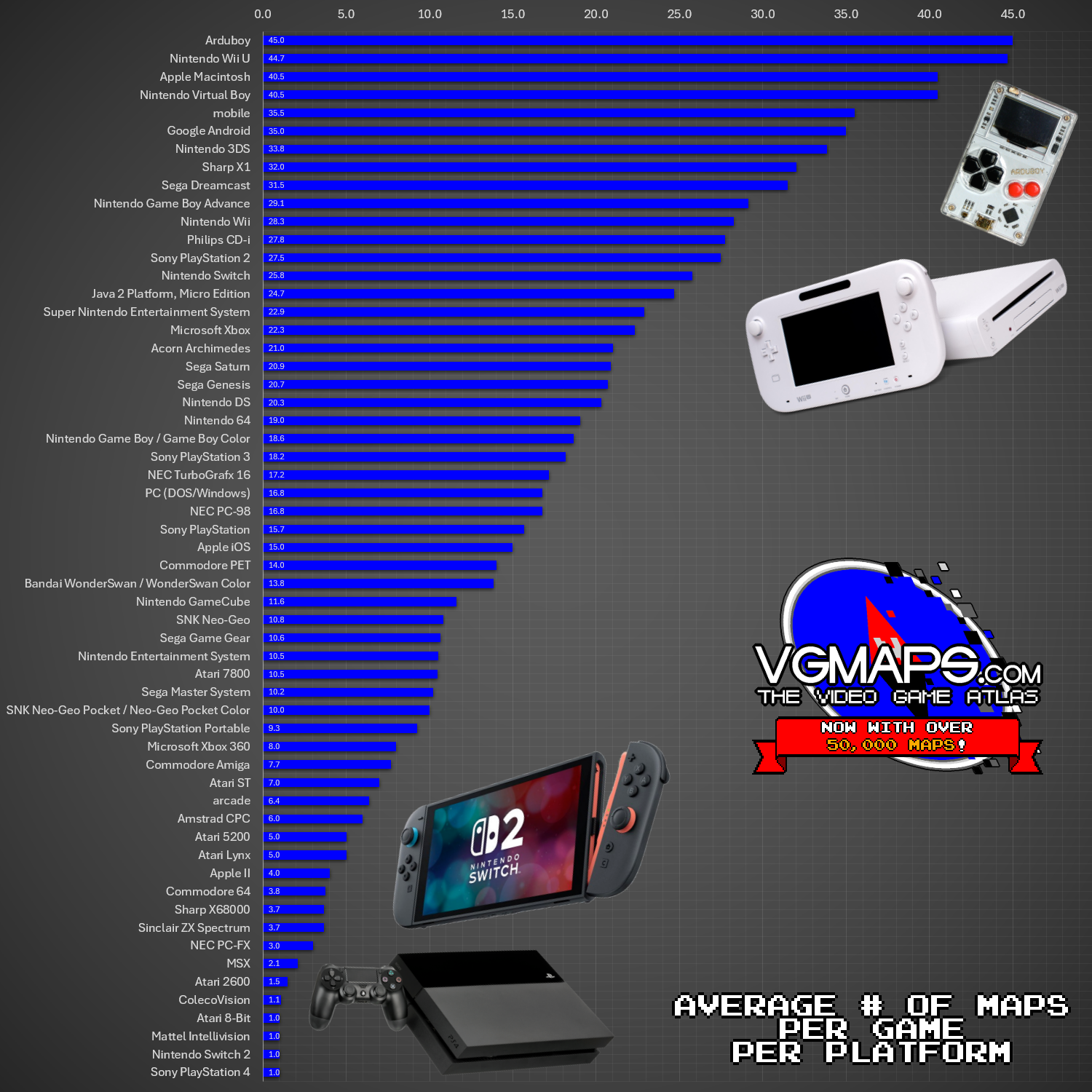
50,000 maps for 3401 games means an average of 14.7 maps per game.
So how about individual platforms?
This table shows the average number of maps per game, per platform.
(How often do you see the Wii U ranked so highly?)
#9
Map Gab / Re: VGMaps.com now has over 50...
Last post by JonLeung - April 12, 2026, 04:43:46 PM
3401 games have at least one map on VGMaps.com.
Here's the breakdown by platform.
818 games are on the NES (including the Famicom and Famicom Disk System), a whopping 24%.
#10
Map Gab / Re: VGMaps.com now has over 50...
Last post by JonLeung - April 11, 2026, 09:17:36 PM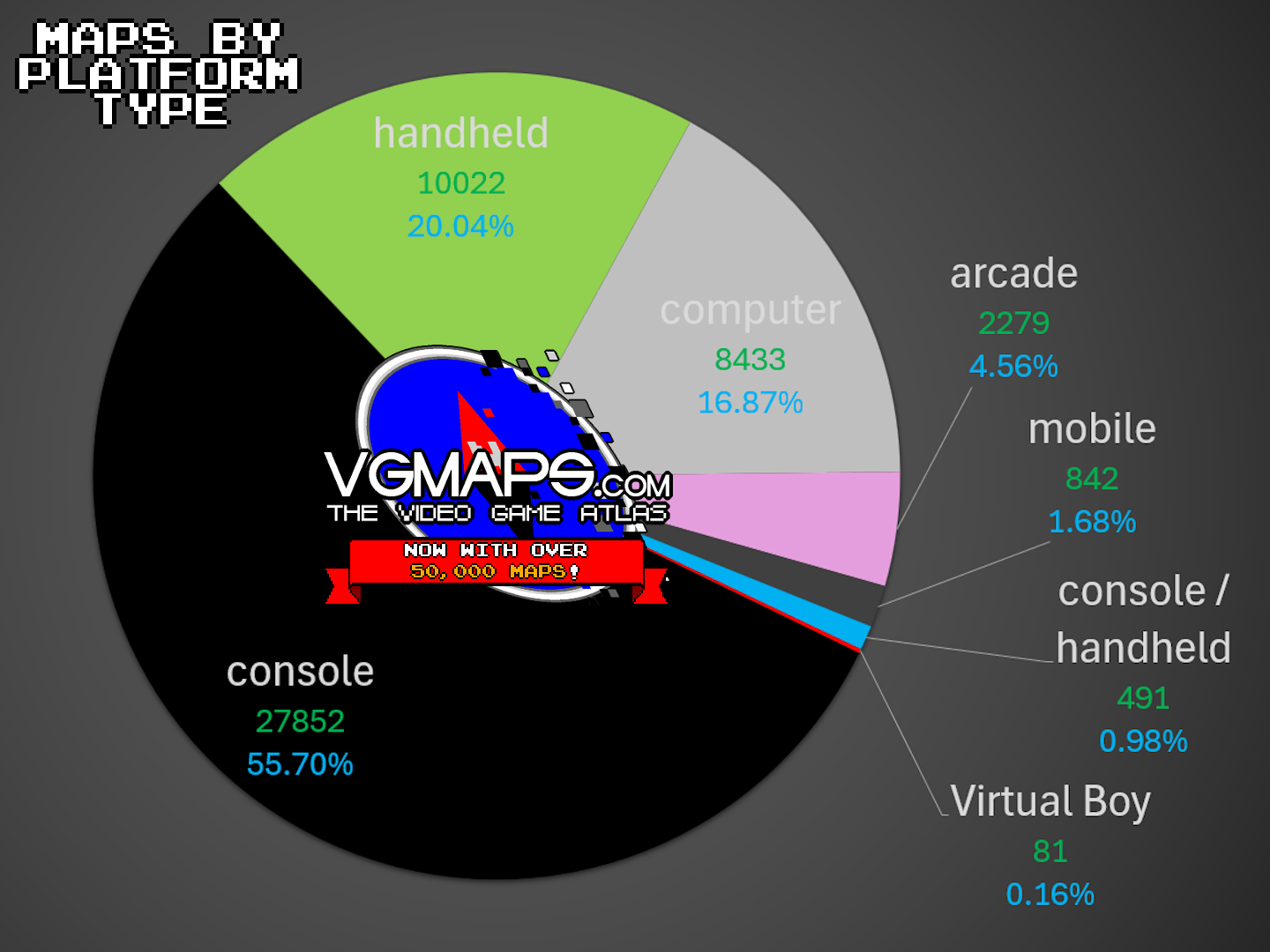
Still celebrating VGMaps.com having 50,000 maps!
It's little surprise that the majority of maps are for console games.
(It'd be nice to have more computer games mapped!
And I don't know what to classify the Virtual Boy as, so it might as well be its own category.)